
Stop Wondering Where Your Money Goes Every Single Month
Most people lose track of their spending across bank apps, notebooks, and half-finished templates. The Ultimate Budget Planner puts your Transactions, Dashboards, 12 Monthly budgets, and wealth-building tools in one download — Excel and Google Sheets, both included.
- 28 tabs across 4 sections, in one file
- Excel and Google Sheets, both included
- Auto-fill tabs and automated dashboards
- Reusable every year, no subscription
Instant download • Works with Excel & Google Sheets • One-time payment
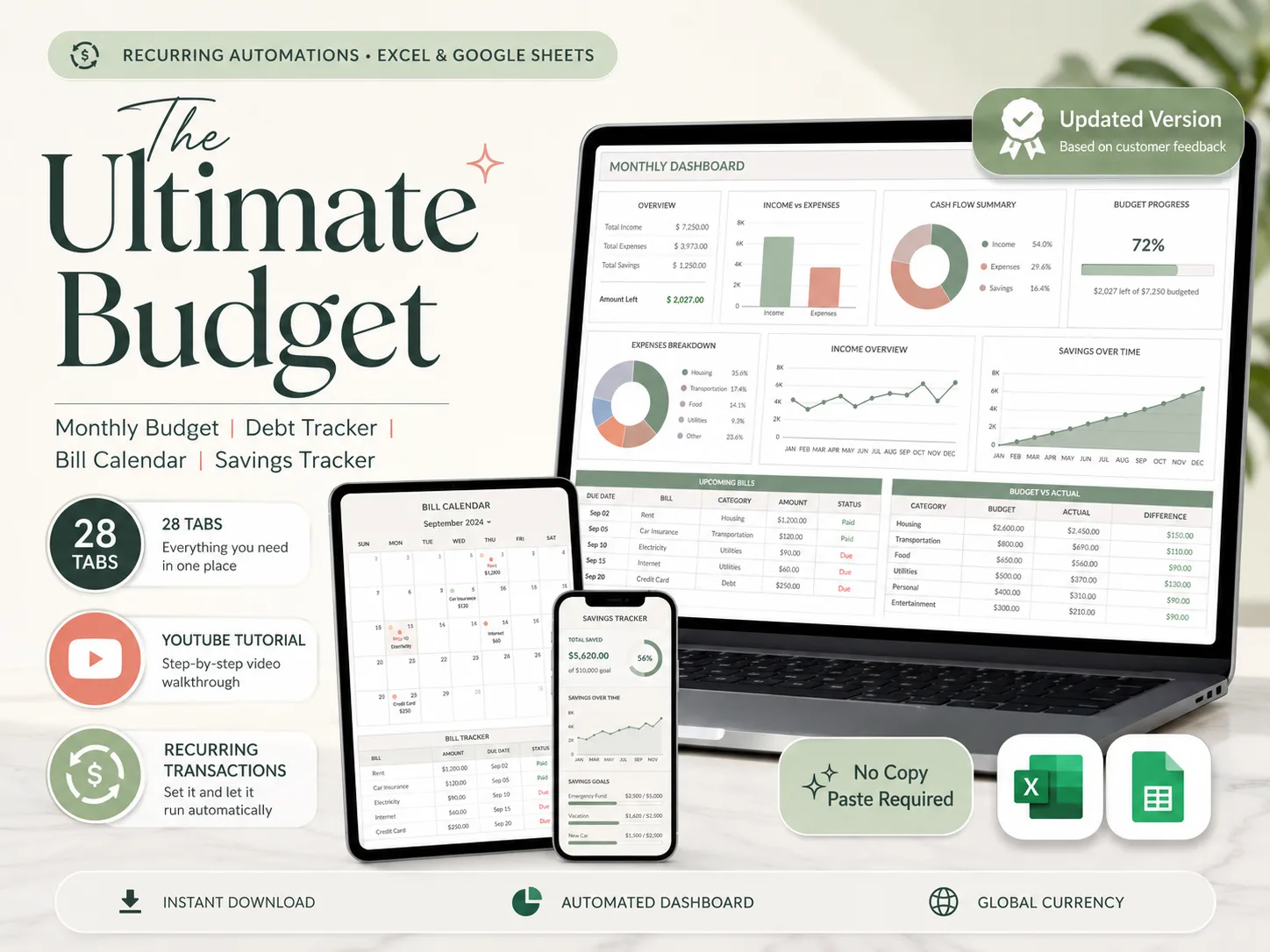
Works wherever you manage your money
28 Tabs. 4 Sections. One Download.
Everything you need to budget with clarity: designed, automated, and ready to use today.


What a Real Budget Dashboard Looks Like
Auto-fill tabs, automated dashboards, and a beginner-friendly setup. Transactions, monthly budgets, debt, and savings — all in one connected file.
Auto-Fill Tabs and Automated Dashboards
Log your transactions once. Monthly, annual, paycheck, and net-worth dashboards update themselves. No formulas to write, no copy-paste.
Excel and Google Sheets, Both Included
One purchase, two formats. Edit in your browser on Mac or PC, or on the go from your phone or tablet.
No Spreadsheet Skills Required
Designed for real people, not accountants. A step-by-step YouTube tutorial with timestamps walks you through every tab.
Reusable Every Year, No Subscription
Duplicate the file for 2025, 2026 and beyond. Pay once, and never get pushed onto a monthly plan.
Everything in One File — 28 Tabs, 4 Sections
Transactions, Dashboards, 12 Monthly tabs, and Build-Your-Wealth tools. Stop juggling five apps and half-finished templates.
Know Exactly Where Your Money Goes
Income-vs-expenses charts, spending breakdowns, and savings trends. Turn scattered spending into a plan you can actually see.
4 Sections. 28 Tabs. Everything Listed.
Transactions (5 Tabs)
Easy Setup, Bank Accounts, Recurring Transactions, Payments, and Variable Transactions. Log once and watch it flow into every dashboard.
Dashboards (4 Tabs)
All-in-One Dashboard, Annual Totals, Automated Calendar, and a Paycheck Dashboard. Automated charts that update themselves.
Monthly Insights (12 Tabs) + Build Your Wealth
One tab for every month — begin any time of the year — plus 50/30/20, Sinking Funds, Debt Calculator, Net Worth, Investment Forecast, and the No-Spending Challenge.
Also Included
Everything in the Ultimate Budget Planner
Every tab works in Excel and Google Sheets. Log your transactions once, and watch the dashboards build themselves.
Transaction Log (Recurring + Variable)
Regain control of your spending with one place for every transaction. Log recurring bills once and record variable spending as it happens — everything flows into your monthly tabs automatically, no copy-paste required.
Bank Accounts & Credit Cards
Associate every transaction with the account or card it came from. Track checking, savings, and credit balances side by side and watch them update themselves as you tick payments off.
Recurring Transactions — Set Once, Never Miss
List each recurring payment a single time, choose a frequency, and the sheet handles the rest — every week, month, or year. Tick a transaction when it's paid and it appears in your monthly tabs instantly.
Monthly Budget Tracker (12 Tabs)
Define your budget by category, compare it against what you actually spend, and let automated color-coded graphs show your monthly picture at a glance. Begin your budget at any month of the year.
All-in-One Dashboard
Instantly access all of your financial data at a glance. Annual income, expenses, savings, and left-to-spend sit up top, with automated charts and a monthly calendar underneath — fully integrated, fully automated.
Annual Totals & Summary
See your financial patterns unfold month by month. Every variable and recurring transaction syncs into a single annual summary — income, bills, subscriptions, expenses, savings, and debt — with no manual entry needed.
Automated Calendar
Track your payments and spending at a glance so you always know where you stand. Choose any day as your week start, color-code your categories, and watch balances update automatically as you mark payments complete.
Paycheck Dashboard
Finally see where your money goes, no matter how often you get paid. Set any budget cycle — weekly, bi-weekly, semi-monthly, or custom — and your real expenses sync automatically to break the paycheck-to-paycheck cycle.
50/30/20 Dashboard
Learn the 50/30/20 method and apply it to your budget with an easy visual dashboard. Set your own needs, wants, and savings ratios, pick any month, and instantly see how your real spending compares to your goal.
Debt Calculator & Sinking Funds
Reach your savings goals and manage your debts with ease. Choose from Snowball, Avalanche, or Custom repayment strategies for up to 40 debts, and track every sinking fund goal in one motivating overview.
Net Worth & No-Spending Challenge
Track your growing net worth and set new challenges for yourself. Organize assets and liabilities in one place, watch your net worth climb over time, and stay motivated with an automated no-spending challenge.
Watch the Tutorial. Set It Up Tonight.
A full step-by-step YouTube walkthrough with timestamps and voiceover. Detailed how-to, with timestamps, full voiceover. Set it up tonight and start using it tomorrow.
What Budgeters Are Saying
More than 160,000 happy customers — real reviews from real budgeters


Perfect for Individuals and Couples
Whether you budget solo or share your finances, the planner is built to manage up to 6 users with ease. A global distribution table shows how much each person earns and spends in every category, so you always see who contributes what — automatically.
28 Tabs, One Download, Yours Forever
Excel and Google Sheets, both included. Open it on your laptop, phone, or tablet. Log your transactions and the dashboards do the rest.
SET UP TONIGHT
Every tab is built, formatted, and pre-formulated. Log your numbers, follow the YouTube tutorial, and you're done in under an hour.
ONE PRICE, ALL YEARS
Pay once and reuse the file across 2025, 2026 and beyond. Simply duplicate the spreadsheet each year. No per-month fees, no subscriptions.
NO SKILLS NEEDED
Beginner friendly. Designed for real people, not accountants. If you can type into a cell, you can budget with this planner.
How It Works
Get started in minutes with instant digital access
Purchase
Complete your secure checkout
Download
Excel file + Google Sheets link by email
Watch the Tutorial
Step-by-step YouTube walkthrough
Track Your Money
Log your transactions, dashboards do the rest
28 Tabs, 4 Sections. $9, One-Time.
Everything on this page is included in a single download: Transactions, Dashboards, 12 Monthly budgets, and Build-Your-Wealth tools, plus the YouTube tutorial. No subscriptions. No upsells.
- Transactions — Recurring, Variable & Bank Accounts (5 Tabs)
- Dashboards — All-in-One, Annual Totals, Calendar, Paycheck (4 Tabs)
- 12 Monthly Budget Tabs (start any month of the year)
- Build Your Wealth — 50/30/20, Sinking Funds, Debt Calculator, Net Worth
- Investment Forecast, Expense Distribution & No-Spending Challenge
- Setup PDF + Comprehensive YouTube Tutorial
Instant digital download • Works with Excel & Google Sheets • One-time payment
This is a digital product with immediate access after purchase. No refunds on digital downloads.
Designed to Fit Your Needs
Compatible with PC, Mac, smartphones and tablets. Edit in your browser or on the go — setup is recommended on a desktop or laptop.
Frequently Asked Questions
Everything you need to know before you buy